SimpleCTF TryHackMe Walkthrough
A Beginner Friendly Guide to Hack Your First CMS Machine
6/26/202610 min read


Introduction
Hey guys! Welcome back to KaylaCyberLabs. Today we are going to solve a very famous beginner room on TryHackMe called SimpleCTF. If you are new to cyber security and you want to learn penetration testing in real way, then this room is best for you. It teach you many basic skills like scanning, finding hidden folders, doing SQL injection, cracking password hash, and privilege escalation.
In this blog I will explain everything in very simple English so even a 10th class student can understand it. We will go step by step, just like a real hacker do in real life. So grab a cup of tea or coffee and let's start this journey together.
This room is part of jeopardy style CTF, that means you get small flags after completing each task, and at the end you get the final root flag which prove that you have completely hacked the machine.
What is SimpleCTF Room?
SimpleCTF is a TryHackMe room which is made for beginners. The main goal of this room is to teach the full attack lifecycle. That means:
First you find what is running on the target machine (this is called reconnaissance).
Then you find a weak point or vulnerability in that service (this is called exploitation).
After that you take control of the machine using that weakness (this is called gaining access).
Lastly you try to become the most powerful user on machine, which is "root" (this is called privilege escalation).
This is exactly how real hackers and penetration testers do their job in real companies, just on a legal and safe environment.
What You Will Learn From This Room
Before we start the walkthrough, let me tell you what skills you will learn after doing this CTF:
Active Reconnaissance: Using tools like nmap and gobuster to find open ports and hidden directories on the website.
Vulnerability Research: How to find a real vulnerability in a CMS (Content Management System) by searching online.
Brute Forcing: How to crack password hashes using tools like John the Ripper or Hashcat.
SSH Access: Using the cracked password to login into the machine through SSH.
Privilege Escalation: Misusing wrong sudo permissions to become root user.
If you are totally new, don't worry. Just have basic knowledge of Linux commands and how websites work, that is enough to start.
Tools We Will Use
Here is the list of tools that we use in this walkthrough. I am telling you so you can install them before starting:
Nmap – for scanning open ports and services
Gobuster – for finding hidden directories on a website
A SQL Injection exploit script – downloaded from Exploit-DB
Hydra – for brute forcing SSH login
John the Ripper or Hashcat – for cracking password hash
GTFOBins website – to find privilege escalation tricks
All of these tools come pre installed in Kali Linux or Parrot OS, so you don't need to download anything extra mostly.
Step 1: Checking the Connection
Before doing anything, always make sure your VPN is connected and the target machine is up and running. You can simply check this by pinging the machine IP address.
ping 10.48.182.222
If you get reply back, that means everything is fine and we are ready to attack (legally, inside the lab only).
Step 2: Reconnaissance with Nmap
The very first and most important step in any penetration test is Information Gathering. We need to know what services are running on the target. For this we use nmap, which is the most popular scanning tool in cyber security world.
Command used:
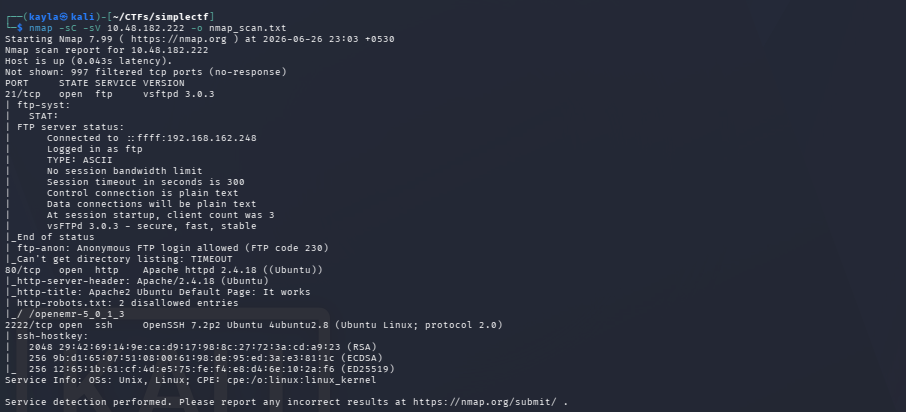
nmap -sC -sV 10.48.182.222 -o nmap_scan.txt
Let me explain this command in simple words:
-sC means run default safe scripts on the target
-sV means detect the version of services running
-o nmap_scan.txt means save the output in a text file so we can check it later
After running this scan, we found out some interesting answers:
Q1: How many services are running under port 1000? Answer: 2
Q2: What is running on the higher port? Answer: ssh
So basically the machine had two services. One was a normal web server (port 80) and another one was SSH service on higher port number. SSH is used for remote login, this is very important info for later steps.
Step 3: Checking the Website
Now since port 80 is open, that means there is a website running on this IP address. So I opened the browser and typed:
But sadly I only found a default Apache2 welcome page. This page does not give any useful information, so nothing interesting here directly. But that doesn't mean we give up. In real hacking, when default page is shown, it usually means there are hidden directories which are not linked anywhere on the homepage. So we need to find them manually.
Step 4: Directory Brute Forcing with Gobuster
To find hidden folders and pages on website, we use a tool called Gobuster. This tool takes a big wordlist (list of common folder names) and tries every single name on the website to check if that folder exist or not.
Command used:
gobuster dir -u http://10.48.182.222 -w //usr/share/dirbuster/wordlists/directory-list-2.3-medium.txt -o gobuster_findings.txt -q -t 100
Explanation of flags:
dir means we want to brute force directories
-u is the target URL
-w is the wordlist path we are using
-o saves result in a file
-q means quiet mode, less unnecessary output
-t 100 means use 100 threads at same time (faster scanning)
After running this command, we got a golden result:
This /simple/ directory was hidden and it was running something interesting.


Step 5: Finding Out What CMS Is Running
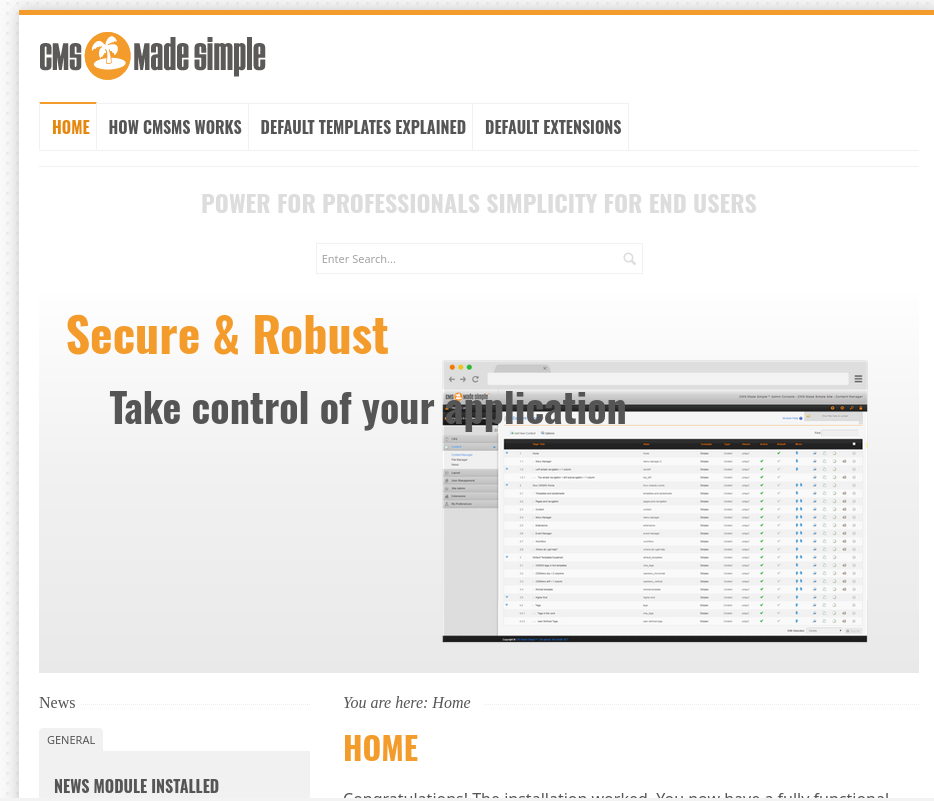
When I opened /simple/ folder, I saw a website which looked like a CMS Made Simple page. At first, honestly I did not know what is "CMS Made Simple", so I searched on Google to learn about it.
CMS Made Simple is a free and open source Content Management System, just like WordPress but much smaller and less popular. Because it is less popular, it also has less security updates, which makes it more easy target for hackers (and CTF makers love using it for this exact reason).
After little bit research, I found something very interesting, a known vulnerability:
Q3: What's the CVE you're using against the application? Answer: CVE-2019-9053
A CVE number is like an ID card given to every publicly known vulnerability. CVE-2019-9053 is a vulnerability found in CMS Made Simple which allow an attacker to perform SQL Injection attack.
Q4: To what kind of vulnerability is the application vulnerable? Answer: sqli (SQL Injection)
SQL Injection is a very dangerous and common web vulnerability where attacker can insert malicious SQL code into input fields, and the database execute that code without checking properly. This can leak sensitive data like usernames, passwords, and other private info.
Step 6: Exploiting CMS Made Simple Using Python Script
Now since we know the vulnerability, the next step is to find an exploit for it. I found a ready made Python script on Exploit-DB website which take advantage of this exact CVE.
Command used:
python3 -u http://10.48.182.222/simple -w /usr/share/wordlists/rockyou.txt
In this command:
-u is the target URL of the CMS
-w is the wordlist used for cracking the password hash (rockyou.txt is most famous password wordlist in hacking world, it has millions of leaked real passwords)
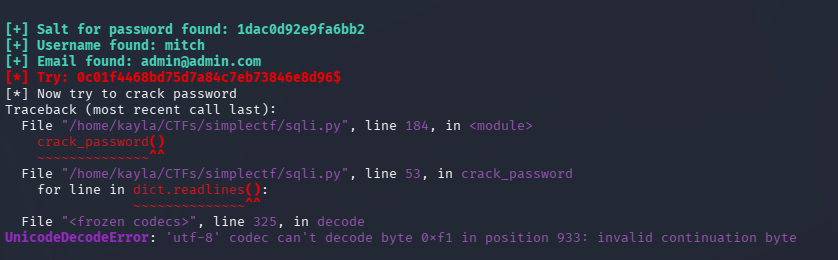
The script did not run 100% perfectly, some part of it failed, but it still gave very useful output. We got:
A username
An MD5 password hash
A salt value used with the password
This is already huge progress! Now we have enough information to try cracking the password.
Step 7: Cracking the Password
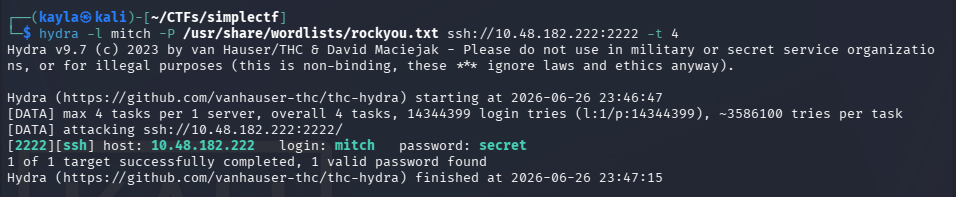
With the username, hash, and salt in our hand, now it's time to either crack the hash directly using John the Ripper or Hashcat, or try brute forcing the SSH login directly using Hydra, since we already know SSH service is open from our nmap scan in Step 2.
After trying brute force attack, we successfully cracked the password!
Q5: What's the password? Answer: secret
Yes, the password was literally "secret". This teach us a very important lesson in cyber security: always use strong and unique passwords, never use simple dictionary words like "secret", "password123" or "admin" because these are the first things attackers try.
Step 8: Logging In via SSH
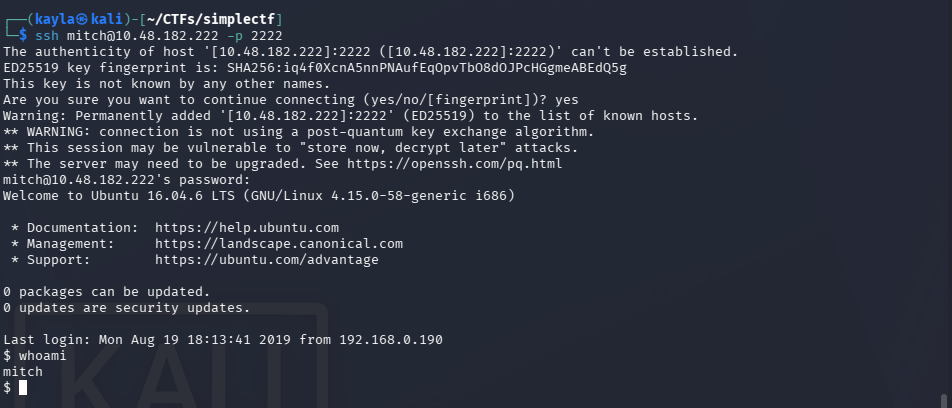
Now we have a valid username and password. Since we already found that SSH service is running on a higher port (from Step 2), this is the perfect place to use our cracked credentials.
Q6: Where can you login with the details obtained? Answer: ssh
Once logged in successfully via SSH, we are now officially inside the target machine! This step is called gaining "initial foothold" in hacking language, that means we have basic low level access to the system.
After exploring a bit, we found the user flag, which prove that we completed the user level part of this challenge.
Q7: What's the user flag? Answer: G00d j0b, keep up!


Step 9: Exploring the Machine
After getting access, a good hacker never stop here. We must explore the machine more to find ways to escalate our privileges, that means becoming a more powerful user, ideally root (the most powerful user in Linux system, similar like Administrator in Windows).
While exploring home directory, we found there is another user present in the system.
Q8: Is there any other user in the home directory? What's its name? Answer: sunbath
This kind of information is very important because sometimes other users have weak permissions too, or maybe they have saved password files, or maybe current user has special access related to that user.
Step 10: Privilege Escalation
Now this is the most exciting part of any CTF, becoming root! To check what special permission our current user (mitch) have, we use this command:
sudo -l
This command shows what commands we are allowed to run as root without entering any password. After checking, we found that our user have permission to run /usr/bin/vim as root, without needing a sudo password!
This is a huge misconfiguration. Many Linux admin make this mistake of giving sudo rights to text editors like vim, nano, or less, without knowing that these editors can be misused to spawn a shell.
To find such tricks easily, hackers use a website called GTFOBins. This website list almost every common Linux binary and show how it can be misused if it has special permission like sudo.
We checked GTFOBins for vim and found the trick:
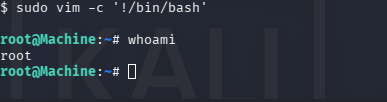
sudo vim -c '!/bin/bash'
Let me explain this command:
sudo vim opens vim as root user (because of the special permission)
-c '!/bin/bash' is a vim command which run a shell command from inside vim itself
Since vim is running as root, the bash shell we open from inside it is also running as root!
And just like that... WE GOT ROOT!
Q9: What can you leverage to spawn a privileged shell? Answer: vim
After getting root access, we explored a bit and found the final root flag.
Q10: What's the root flag? Answer: W3ll d0n3. You made it!
Full Attack Summary
Let's quickly summarize the complete attack path we followed, so it's easy to remember:
Checked machine is online using ping
Scanned open ports and services using nmap
Found a web server with default Apache page
Used gobuster to brute force hidden directories
Found /simple/ directory running CMS Made Simple
Researched and found CVE-2019-9053 (SQL Injection vulnerability)
Used a Python exploit script from Exploit-DB to extract username, hash, and salt
Cracked the password using wordlist attack
Logged in via SSH using cracked credentials
Found user flag
Found another user "sunbath" in home directory
Checked sudo permissions, found vim has root access without password
Used GTFOBins trick to spawn root shell from vim
Captured the root flag
Lessons Learned From This Room
Even though this is just a CTF room for practice, it teach us very real and important lessons which apply to real world cyber security:
Always update your CMS and plugins – CMS Made Simple had a known CVE, and if it was patched, this attack would not have worked.
Never use weak or common passwords – "secret" is way too easy to crack, real organizations should enforce strong password policy.
Be careful while giving sudo permissions – Giving sudo access to binaries like vim, find, less, more, nano without restriction is very dangerous, because most of them can spawn a shell.
Hidden directories are not actually hidden – If your website folder is not linked anywhere, that does not mean it is secure. Tools like gobuster can easily find them.
Regular security audits matter – Many real world breaches happen because of small misconfigurations, exactly like what we saw with vim sudo permission in this room.
Why Should Beginners Try This Room?
If you are starting your journey in cyber security or ethical hacking, SimpleCTF is honestly one of the best room to start with, because:
It is not too hard and not too easy, perfect balance for beginners
It teach you full attack chain in one single room
It cover multiple categories: web exploitation, password cracking, and privilege escalation
It is completely legal, since TryHackMe gives you safe environment to practice
I personally recommend every beginner to try solving this room by themselves first before reading any walkthrough (including this one), because that is the only way you really learn hacking skills properly. Use this blog only if you get totally stuck.
Final Words
That's all for today's walkthrough guys! I hope this blog helped you understand how SimpleCTF room works in very simple and easy language. Remember, hacking is not about typing fancy commands, it's about understanding the logic behind every step, why we are doing it, and what it teach us.
If you enjoyed this blog, make sure to bookmark KaylaCyberLabs and keep practicing on TryHackMe and other similar platforms like Hack The Box. Always remember to hack legally and ethically, only on machines and platforms where you have proper permission.
See you in next walkthrough, happy hacking! 🚀